








 Diagnostics








A load delivers on Tuesday. The proof of delivery lands in the transportation management system (TMS) on Wednesday. And the invoice? Someone in finance is still rekeying accessorials on Friday, hoping the detention charge buried in the driver’s notes matches what the customer agreed to pay.
That gap between when freight moves and when money moves is where margin slips away. TMS integration closes it by connecting shipment data directly to invoicing and ERP, so billing runs off the same record operations already trusts. For carriers, brokers and 3PLs, it’s one of the fastest ways to tighten the link between operations and revenue, and it’s a core focus of RecVue’s transportation and logistics solutions.
This blog outlines how that connection works: what data flows where, how to set up invoicing and ERP integration, the main integration types, and the challenges worth planning for before go-live.
What is TMS integration and why billing needs it
TMS integration connects the TMS to the other systems a business runs on, such as invoicing, ERP, warehouse management, carrier networks and fleet telematics, so data moves between them automatically instead of by email, spreadsheet or copy-and-paste.
Most shippers, carriers and 3PLs already lean on a TMS for planning and execution. Fortune Business Insights valued the global TMS market at $18.7 billion in 2025 and expects it to reach $21.3 billion in 2026. The same report names integration complexity, particularly with legacy ERP and warehouse systems, as a key brake on adoption.
That’s the billing problem in a nutshell. The TMS knows what shipped, how far it went, what it cost and what happened along the way. If finance can’t reach that data cleanly, every invoice becomes a reconstruction project. Charges get missed, rates get keyed wrong and disputes pile up. Integration turns the TMS into the front door of order-to-cash process automation instead of a data island finance has to visit.
Benefits of connecting your TMS to invoicing and ERP
The payoff to integration shows up on both sides of the house—operations stops fielding “what happened on this load?” emails, and finance stops chasing data it should already have.
- Fewer manual entries and billing errors. When rates, accessorials and reference numbers flow straight from the TMS, nobody has to rekey them. No rekeying means no fat-fingered fuel surcharge.
- Faster invoicing and payment cycles. Invoices can generate the moment proof of delivery posts rather than waiting for a weekly batch. Earlier invoices mean earlier cash and a shorter days sales outstanding.
- Better visibility across shipment, billing and financial data. Finance can see where a load stands, and operations can see whether it has been billed and paid.
- Easier reconciliation. When the TMS and ERP share the same load, order and customer IDs, matching a shipment to an invoice to a general ledger entry becomes a lookup, not an investigation.
There’s another benefit, too. Revenue protection.
Accessorials that never make it onto an invoice, like detention, liftgate and redelivery, are a classic source of revenue leakage. A connected workflow captures the charge where it happens instead of relying on someone to remember it later.
How to connect your TMS to invoicing software
The goal is simple to state but harder to execute. Every billable event in the TMS should become an accurate invoice line without a human retyping it. That starts with knowing which data has to move and agreeing on what ready to bill means.
Data that flows from TMS to invoices
- Shipment, freight rate and accessorial charge data. Origin, destination, weight, class, mileage, base rate, fuel surcharge and any accessorials such as detention, lumper or inside delivery.
- Customer, carrier and shipment reference information. The details customers need to approve an invoice without kicking it back, including bill-to account, PO and BOL numbers, PRO numbers and the carrier of record.
- Proof of delivery, invoice status and billing details. POD documents and timestamps, payment terms and status flags that tell the invoicing system a load is complete and billable.
Steps to set up TMS invoicing integration
- Map the data and define requirements. Match TMS fields to invoice fields, agree on charge codes and decide which event triggers an invoice (delivery, POD upload or a manual release). This is where most of the real work lives.
- Test with real invoices. Run historical loads through the integration and compare the output against invoices your team produced by hand. Build validation rules for missing references and out-of-tolerance rates, and decide where exceptions go.
- Launch, monitor and adjust. Go live with a subset of customers or lanes, watch exception queues closely for the first few billing cycles and refine mappings as new charge types appear.
How to connect your TMS to your ERP
If invoicing integration gets the bill out the door, ERP and TMS integration makes sure the books match what actually happened on the road. It’s how freight revenue and freight costs post to the right accounts, in the right period, without a month-end scramble.
Data that syncs between TMS and ERP
Not every record moves in the same direction or at the same speed. A typical setup looks like this: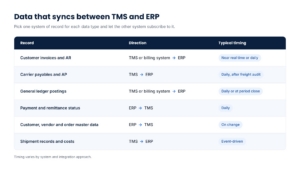
A good rule of thumb is to pick one system of record for each data type and let the other system subscribe to it. Two systems that can both edit a customer’s billing address will eventually disagree.
Steps to set up TMS ERP integration
- Set scope, access and data requirements. Decide which entities, accounts and processes are in scope. Confirm API or database access on both sides, and align on chart-of-accounts mapping early. This is the step most likely to stall.
- Test syncs, reconciliation and exception handling. Run parallel postings for at least one close cycle and reconcile TMS totals against ERP totals. Define what happens when a record fails: who gets alerted, where it queues and how it’s retried.
- Plan cutover, go live and review. Choose a cutover date that avoids quarter-end, freeze master data changes during the switch and schedule a post-launch review after the first full close.
Common TMS integration types
Most transportation tech stacks use a mix of the approaches below. Knowing where each fits helps you decide what to build, buy or leave alone.
EDI integration
TMS EDI integration is still the workhorse for structured, high-volume exchanges between shippers, carriers and customers. The usual suspects include the X12 204 (load tender), 990 (tender response), 214 (shipment status) and 210 (freight invoice).
Cloud-based EDI providers have removed much of the pain of managing trading partners, though onboarding each new partner still requires testing. For billing, EDI 210s and 214s matter most. They carry the charges and the delivery confirmation that triggers them.
WMS integration
WMS and TMS integration connects what happens inside the four walls with what happens on the road. Shared order, inventory and shipment data lets the TMS plan loads around what’s actually picked and packed. Warehouse events such as a late pick, a short shipment, or an extra pallet change transportation plans and often change the bill. Capturing them at the source keeps invoices honest.
Carrier, freight and fleet integration
This is where TMS integration for freight and carriers gets granular:
- Carrier portals, load boards and carrier data for capacity, tendering and rate confirmations.
- ELD integration with platforms such as Motive and Samsara, which supplies time-stamped arrival and departure data, or the evidence behind detention and layover charges.
- Fuel providers and freight data, including fuel card feeds and the weekly diesel prices published by the U.S. Energy Information Administration that many fuel surcharge tables are built on.
API and custom integrations
Standard connectors cover common paths. APIs and custom builds are more suitable for filling the gaps when timing, volume or business rules are unusual, including:
- Real-time data exchange through APIs and webhooks for shipment status, rate updates and invoice triggers.
- Route and mileage tools such as PC*Miler for mileage-based rating and validating that the miles billed match the miles driven.
- ERP systems, accounting software and other business systems that don’t offer a prebuilt connector to your TMS.
- Security and compliance controls, including role-based access, audit trails and encryption for financial data in transit and at rest.
Integration use cases by shipping mode
Every mode bills differently, so the value of integration shows up in different places.
- LTL. LTL billing lives and dies on shipment-level detail: class, weight, dimensions and a long menu of accessorials. When AFS Logistics audited nearly 250,000 LTL invoices, it found errors on about 4.5%, and accessorials accounted for 42.8% of those errors. TMS integration for LTL shipping efficiency means accessorials flow from the event that caused them, not from memory.
- Truckload. Truckload invoices are simpler per load, but carrier settlement is where things get messy. Integration ties the customer invoice, the carrier payable and any detention or layover to the same load, so margin per load is visible before the month closes.
- Intermodal and parcel. Multistage shipments generate charges from rail, drayage and final-mile providers, often on separate invoices. Integration rolls those legs into one customer-facing bill and matches each cost to the right shipment.
Integration challenges and best practices
Integrations rarely fail on day one; they drift. A new accessorial code shows up, an ERP upgrade renames a field, or the one person who understood the mapping changes jobs. Here’s where teams usually get tripped up and what keeps things on track.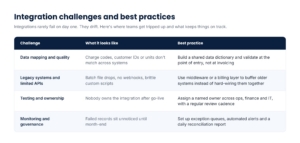
The common thread is treating integration as a business process, not an IT project. The teams that do it well review exceptions as routinely as they review AR aging.
Choosing the right TMS integration for your billing workflow
There’s no single right answer, but there is a right answer for your volume, contracts and systems. Start with the three main options: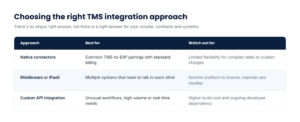
Then pressure-test the choice against a few questions:
- Shipment volume and carrier mix. How many loads, modes and trading partners will this need to handle in three years, not just today?
- Billing complexity. Do your contracts include tiered rates, minimums, fuel tables or customer-specific accessorials? The more complex the pricing, the more you need a dedicated billing layer rather than a pass-through connector.
- ERP compatibility. Will the integration survive your next ERP upgrade, or the one after that?
- Implementation and vendor support. Who configures it, who fixes it and how fast?
- Long-term maintenance and flexibility. Can business users update rules and charge codes, or does every change need a developer?
The TMS should own operations, the ERP should own the books and a purpose-built billing automation platform should sit between them to turn complex contracts into accurate invoices.
That middle layer is what lets transportation companies change pricing without rewiring integrations every time.
Conclusion
Your TMS already holds the truth about every load. What moved, where, when and at what cost. TMS integration makes that truth the starting point for billing instead of something finance has to reconstruct after the fact. Connected to invoicing and ERP, it shortens the path from delivery to cash, cuts the errors that trigger disputes and closes the gaps where revenue slips away.
A good next step is a simple audit of your current process. Pick 10 recent invoices and trace each one back to the load. Count the handoffs, the rekeyed fields and the charges that almost didn’t make it. Those are your integration priorities, and they’re usually hiding in plain sight.
Frequently asked questions
How much does a TMS integration cost?
It depends on the approach. Native connectors are often bundled into software subscriptions, while middleware adds a platform license and custom API work adds development and maintenance costs. The biggest variables are the number of systems involved, data quality and billing complexity. Budget for ongoing upkeep, not just the initial build.
How long does a TMS integration take to implement?
A straightforward native connector can be live in weeks. A multisystem project covering invoicing, ERP, EDI partners and carrier data more commonly runs several months. Data mapping and testing, not coding, usually set the pace.
How is data kept secure during a TMS integration?
Through encryption in transit and at rest, role-based access controls, authenticated APIs and complete audit trails. Ask vendors about their security certifications, such as SOC 2, and confirm how financial data is logged and retained.
Can a TMS connect to more than one ERP or accounting system?
Yes. Companies with multiple business units or acquired entities often run several ERPs. Middleware or a central billing platform can route each transaction to the correct ledger based on entity, region or customer.
How do you measure the ROI of a TMS integration?
Track a before-and-after baseline on a handful of metrics: time from delivery to invoice, invoice error and dispute rates, days sales outstanding, hours spent on manual billing and recovered accessorial revenue. Most teams see the earliest gains in invoice speed and dispute volume.
About the Author